




Apr
If you searched for “Claude NotebookLM skill” or “how to automate research with NotebookLM,” here is the short version.
The interesting part is not that NotebookLM suddenly became 10x better.
It is that Claude can be given a reusable skill file that tells it how to create notebooks, load sources, generate outputs, and follow presentation or style rules. In practice, that turns NotebookLM from a manual research UI into part of a repeatable workflow.
That is useful if you want to:
- turn a topic into a research notebook faster
- generate slide decks from source material or markdown notes
- reuse the same style rules across outputs
- run recurring research on a schedule
- reduce the amount of repetitive setup work in NotebookLM
This is where the real value is. Not magic. Not a native Claude and NotebookLM merger. Just a more structured way to use both together.
What this Claude + NotebookLM workflow is actually doing
The workflow shown in the source is pretty simple once you strip away the headline.
Claude acts as the orchestrator. NotebookLM acts as the research and artifact engine.
The pattern looks like this:
- Claude gets a NotebookLM skill file
- that skill tells Claude how the integration works
- the user logs into Google once
- Claude can then create notebooks, add sources, and trigger outputs
- the same skill can store design or formatting guidance
- the workflow can later be reused or scheduled
So the real improvement is not intelligence. It is operational memory.
Instead of manually repeating the same steps inside NotebookLM every time, the workflow pushes those steps into a reusable spec.
Why people care about this workflow
There are three practical reasons people will care about this setup.
1. It makes research workflows less manual
Normally, using NotebookLM means opening the tool, creating a notebook, adding links or files, waiting for ingestion, then choosing what to generate.
With a Claude skill in front of it, more of that setup can be handled through one instruction.
That makes sense for people who repeat the same research task often.
2. It separates content from presentation
One of the most useful ideas in the source is that Claude can combine:
- a research file or markdown draft
- style guidance stored in the skill
- a generation request for NotebookLM
That means your content can stay in one place while the formatting rules stay in another.
If you regularly turn notes into decks, briefs, or summaries, that separation is genuinely helpful.
3. It opens the door to recurring research
The most practical extension is scheduled research.
Instead of running a one-off prompt every time, you can define a recurring topic, reuse the same workflow, and save the outputs into a stable folder.
That is useful for:
- founder or operator briefings
- competitor monitoring
- niche trend tracking
- content research
- newsletter prep
- internal team updates
What changed, really?
If you are wondering what is actually new here, the answer is not “NotebookLM got new superpowers.”
The more important change is this:
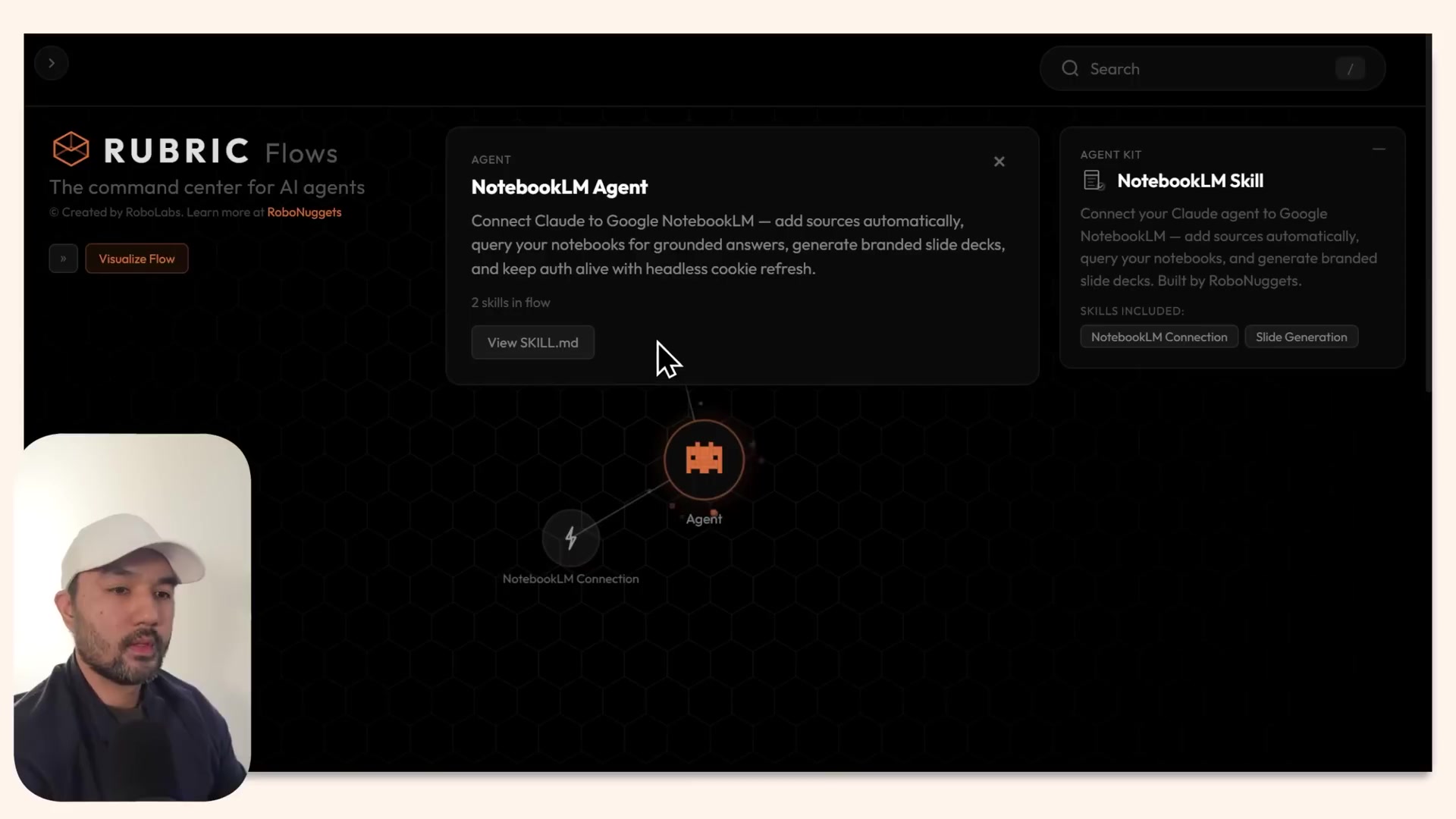
Claude can use a reusable skill file as an operating manual for how to work with NotebookLM.
That file can hold:
- setup instructions
- tool access rules
- output preferences
- slide or design guidance
- questions to ask before changing defaults
That matters because it moves the workflow out of a one-off chat and into a reusable system.
Best use cases for Claude + NotebookLM right now
This setup looks most useful in a few specific cases.
Topic research to briefing deck
If you need to research a topic, gather web or YouTube sources, and turn that into a presentable internal deck, this is a strong fit.
Markdown or script to slides
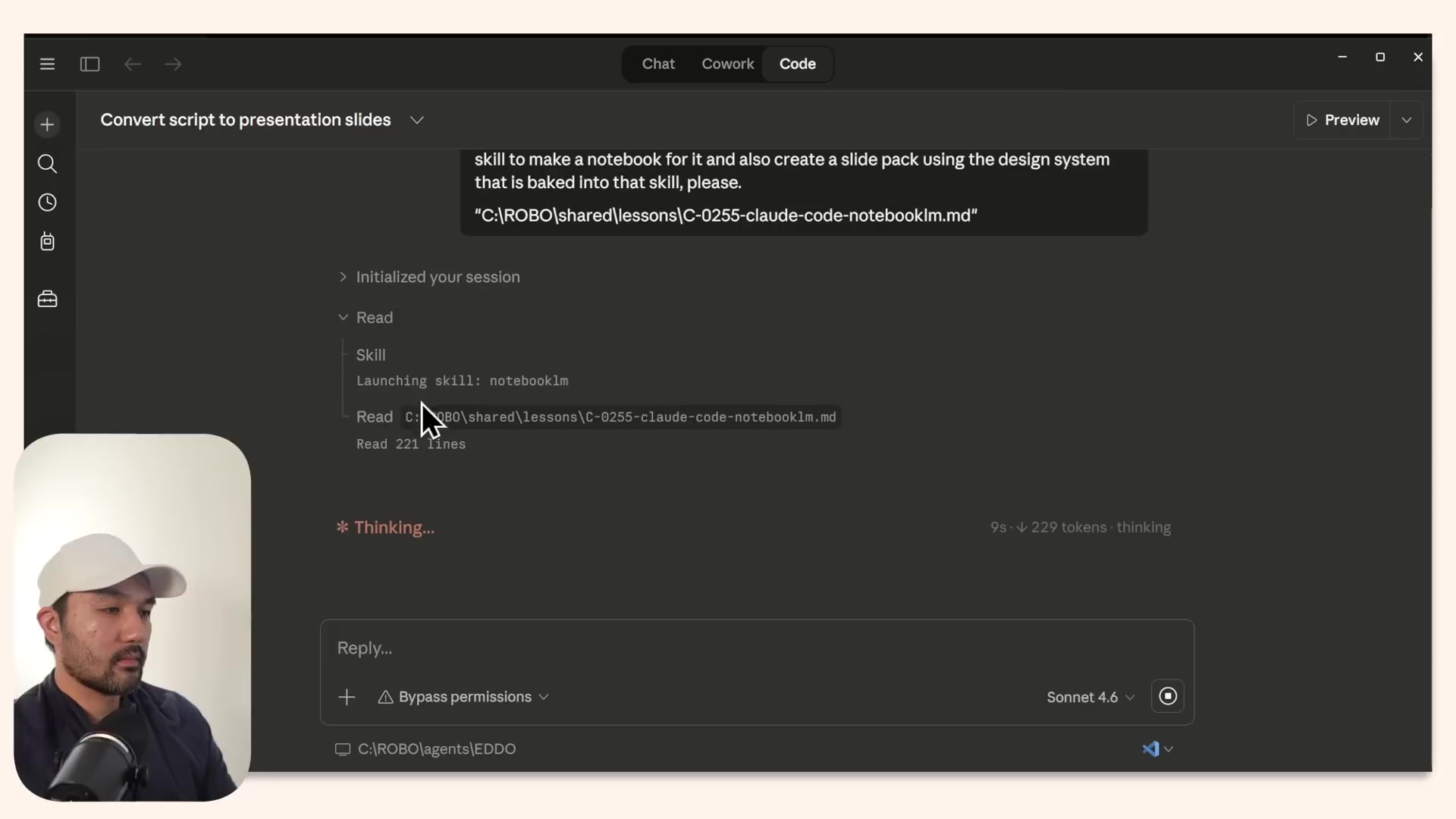
The source shows a workflow where a markdown research file or script becomes the basis for a slide deck. That is probably one of the clearest practical use cases.
Branded repeat outputs
If your team wants outputs to follow a certain visual style, palette, or tone, storing those rules in the skill is better than rewriting them every time.
Scheduled recurring briefs
This may be the highest-upside use case. If you track the same topic daily or weekly, automating notebook creation and output generation can save real time.
What is hype, and what is actually useful
A fair read of the source is that some of the framing is marketing, but the underlying workflow is still useful.
Probably hype
- “10x more powerful”
- the idea that this removes prompting entirely
- any suggestion that this is a polished set-and-forget system for every user
Actually useful
- giving Claude a persistent NotebookLM operating spec
- storing style guidance outside the chat
- turning markdown or source bundles into repeatable outputs
- adding a clarification step before updating the workflow defaults
- using the same flow for recurring research jobs
That is a much more grounded way to understand the demo.
The biggest limitation to know before trying it
This does not look like a native official Claude-NotebookLM partnership.
It appears to depend on a bridge package or integration layer plus a reusable skill.
That means the likely failure points are pretty predictable:
- auth state breaks
- the Google login expires
- the integration package is not installed correctly
- files are not where the workflow expects them
- scheduled tasks run in the wrong environment
- output quality is only good enough for first drafts
So if you try this, think of it as workflow automation with setup overhead, not a frictionless consumer feature.
A simple starter workflow to copy
If you want the practical version without the hype, this is the best pattern to steal.
Step 1: Pick one repeated research task
Examples:
- weekly AI tool roundup
- competitor tracking for one niche
- research for a YouTube script or newsletter issue
- internal trend briefing for your team
Step 2: Keep your inputs clean
Use a predictable input structure, such as:
- one markdown brief
- a short topic description
- a small set of source URLs
- optional style rules for output
Step 3: Store the instructions in the skill, not in every chat
The skill should define:
- how to create or find notebooks
- what kinds of sources to load
- what output to generate
- naming and saving rules
- any design or presentation defaults
Step 4: Start with one output format
Do not automate five things at once.
Start with one repeatable output, such as:
- summary memo
- slide deck
- research brief
- study guide
Step 5: Add clarification rules
One of the smartest patterns in the source is asking clarifying questions before the skill is updated.
That reduces the chance of locking in bad style or formatting decisions.
Step 6: Only then test scheduling
Once the manual workflow works reliably, then try recurring runs.
That order matters. If you schedule a brittle workflow too early, you just automate failure.
Should you use Claude with NotebookLM this way?
My take is yes, but only if your work is repetitive enough.
This setup is probably worth exploring if you:
- do recurring research
- already use NotebookLM often
- need repeatable slide or briefing outputs
- want an agent to handle more of the setup work
- are comfortable with a bit of implementation friction
It is probably not worth the trouble if you:
- only use NotebookLM occasionally
- just need one-off summaries
- expect polished final design output every time
- do not want to manage integrations or scheduled runs
Why this matters beyond the headline
The biggest takeaway is not about a viral demo.
It is that research workflows are getting more modular.
Claude can hold the operating instructions. NotebookLM can handle the source-grounded artifact generation. The user can refine the system over time instead of rebuilding it from scratch in each chat.
That is a real shift toward practical AI workflow automation.
For people building research habits, content systems, or internal knowledge workflows, that is more interesting than the “10x” claim.
Final verdict
This Claude + NotebookLM workflow is most useful as a practical research automation setup, not as a miracle tool upgrade.
The real value is in four things:
- agent-led notebook setup
- reusable skill-based instructions
- content-to-output workflows like markdown to slides
- recurring research runs for repeated topics
If you keep your expectations realistic, that is enough to make it worth paying attention to.
And if you are building repeatable workflows around research or content production, this is a good reminder that the winning move is often not a better prompt. It is a better system.
If you are exploring repeatable digital workflows, you might also want to map where these kinds of research systems fit inside your broader AI prompts and workflows stack. Light structure goes a long way here.
